
How to close a CFD position step by step
Reading time: 9 minutes
Contracts for Difference (CFDs) are widely used because they allow traders to speculate on both rising and falling markets without having to own the underlying asset. You can increase market exposure through leverage with only a small upfront capital deposit. However, opening a CFD trade is only half the process. You also need to decide when and how to exit it because you might want to secure a profit, limit a loss or simply move on to another trading setup.
Knowing how to close a CFD position is an important part of managing a trade. The process itself is usually straightforward, but there are a few things to check before you confirm the order. Closing the wrong position, entering the wrong trade size or assuming your order will be filled at the requested price.
Key Points
- Closing a CFD position ends your exposure to that trade and realises its profit or loss, before any applicable charges.
- You can close a position manually, exit only part of it or use a stop-loss or take-profit order to trigger an automatic exit.
- Always check the instrument, trade size and execution details before closing. The final price may differ from the one you see on screen.
What does it mean to close a CFD position?
With a CFD, you can open a long position if you expect the price to rise or a short position if you expect it to fall. Closing the position ends that particular trade. Your profit or loss is calculated from the difference between your opening and closing prices, adjusted for your position size and applicable trading charges.
For example, suppose you buy a share CFD at $50 and later close it at $54. If your position represents 100 shares, the gross profit is $400, before spreads, commissions and other applicable costs. If the price falls to $47 instead, closing the same position would produce a gross loss of $300. The same principle applies to a short position, although the price movement works in reverse. If you sell a share CFD at $50 and buy it back at $46, you make a gross profit of $400 on a position representing 100 shares. These examples are simplified and exclude leverage-related considerations, financing charges and other costs.
How to close a CFD position
The exact steps depend on your trading platform, but the general process is similar across most platforms.
Step 1: Open your trading platform
Log in to your trading account and open the platform where you placed the trade. Make sure you are using the correct account and can access your open positions.
Step 2: Find the position you want to close
Open the section displaying your open positions. In MetaTrader 4 (MT4) and MetaTrader 5 (MT5), you can find open positions in the Trade tab of the Terminal or Toolbox window, depending on the platform layout.
Check the instrument name, whether the position is a Buy or Sell, and its volume. If you have several positions open, take a moment to identify the correct one. This matters more than it might seem. Closing a profitable trade when you intended to exit a losing position can change your overall exposure in ways you did not plan.

Choosing an open position on MT4 & MT5
Step 3: Select the close option
Choose the position and the relevant close command. On MT4, this is usually labelled Close Order, while in MT5, you can select Close Position. The platform will then process your request according to its execution settings.
Depending on the platform and account, you may see a confirmation window or a close button beside the open position.
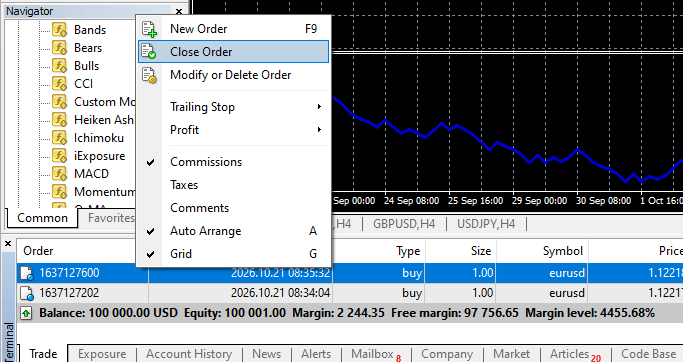
Closing an order on MT4 & MT5
Step 4: Check the trade details
Before confirming, check the volume you want to close and any price information shown. If you intend to exit the entire trade, make sure you have selected the full position size.
Market prices can change while an order is being processed. Depending on the execution model and market conditions, your position may close at a price different from the one displayed when you clicked the button.
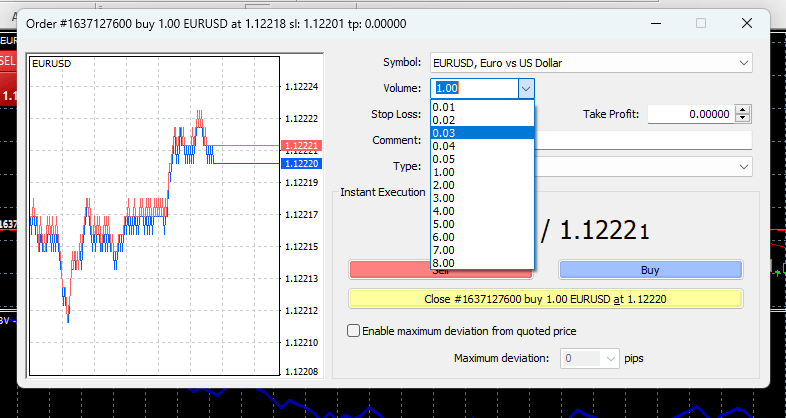
Choosing trade volume on MT4 & MT5
Step 5: Confirm and check the result
Confirm the close instruction if the platform requests it. Then return to your open positions and check whether the trade has disappeared or whether any volume remains.
Review your account history or trade statement to see the closing price and realised profit or loss. If the position is still open, check its status rather than assuming the order went through.

Checking account history on MT4 & MT5
Can you partially close a CFD position?
Yes. Some platforms allow you to close part of an open position while keeping the remainder active. This can be useful if you want to reduce exposure without exiting the trade entirely. For example, suppose you hold a Buy position of 1.0 lot on a currency pair. You decide to close 0.4 lots after the price moves in your favour, leaving 0.6 lots open. The closed portion’s profit or loss is realised, while the remaining position continues to be exposed to market movements. Any applicable costs will depend on the trade and broker's terms.
To do this, select the position, choose the close command and enter the volume you want to exit instead of the full amount. Check that the remaining volume meets your broker’s minimum trade-size and volume-increment requirements.
The process varies by platform and account type, so check the relevant instructions before placing the order.
What happens when you close a CFD trade?
Once the closing order is executed, the position’s profit or loss is realised. The amount is reflected in your account balance, subject to applicable charges and the broker’s account procedures. Closing a trade also changes your market exposure and margin requirements. When a position is fully closed, the margin reserved for it is generally released, although other open trades and account rules can affect the margin available to you.
Remember that the displayed profit or loss may not be the final net result. Consider the following:
- Spread: The difference between the bid and ask prices can affect the cost of entering and exiting a position.
- Commission: Some CFD instruments or account types charge a separate commission.
- Overnight financing: Holding a position overnight may incur a financing charge or credit, depending on the instrument and terms.
- Slippage: The closing order may execute at a different price from the one expected, particularly during volatile or illiquid market conditions.
Understanding these costs and execution factors helps traders assess the final result of a closed position more accurately.
Can a CFD position close automatically?
You don’t always have to close a position manually. Stop-loss and take-profit orders can instruct the platform or broker to close a position when the specified price level is reached.
A stop-loss order is generally used to help limit a potential loss by setting an exit level, while a take-profit order is used to close a position after the market reaches a specified favourable level. However, neither level can act as a guaranteed execution price. In fast-moving markets or when prices gap, a stop-loss may execute at a less favourable price than specified. The precise handling depends on the order type, instrument and broker’s terms.
A trailing stop is another option. It adjusts the stop level as the market moves in your favour, according to the settings you choose. However, it does not guarantee that a position will close at the exact trailing-stop level.
Close your trades with a clear plan
Learning how to close a CFD position becomes easier once you understand the platform’s controls and the effect of an exit order. Identify the correct trade, check its volume, select the close option and verify the execution. The more important part is knowing why you are exiting. Whether you are taking a profit, reducing exposure or managing a loss, a clear plan can help you make decisions more consistently.
Explore FP Markets’ trading platforms and educational resources to learn more about managing your trades and using platform features. Open your account to start your trading journey.
Frequently asked questions (FAQs)
You can generally close a position while the relevant market is open and trading is available on your account. Market hours, temporary trading restrictions, liquidity and platform conditions can affect when an order can be executed.
No. Closing a profitable position realises the gain, before applicable charges. However, the final amount may differ from the profit shown before execution because prices can move and trading costs may apply.
Closing a position ends an existing trade. Cancelling an order removes an instruction that has not yet been filled, such as a pending order to open a position. If a pending order has already triggered and opened a trade, you must close the resulting position separately.